<p><img src="https://oscimg.oschina.net/oscnet/up-e9aefee21c39a90502372bbc21278d3d1c9.png" alt=""></p> Abstract
Running Apache Kafka in the cloud is constrained by three fundamental engineering challenges: the heavy reliance on local disks for low-latency performance, excessive cross-availability zone (AZ) data transfer costs, and the lack of elasticity caused by tightly coupled compute and storage.
In response, AutoMQ has architected a completely new Diskless Kafka solution built on Amazon FSx and S3. This article details how AutoMQ re-engineers the storage layer to achieve sub-10ms write latency while maintaining 100% compatibility with the Kafka protocol—delivering a cloud-native Kafka platform that is high-performance, operationally effortless, and significantly cost-efficient.
Note: Unless otherwise specified, all references to AutoMQ in this article refer to the AutoMQ BYOC edition.
FSx for NetApp ONTAP
Before delving into the implementation details of AutoMQ, let’s first introduce FSx for NetApp ONTAP (referred to as FSx hereinafter), which is the cornerstone for AutoMQ to achieve sub-10ms performance on AWS.
Amazon FSx for NetApp ONTAP is a fully managed service that provides highly reliable, scalable, high-performing, and feature-rich file storage built on NetApp’s popular ONTAP file system.
- FSx is architected to deliver consistent sub-10ms latency for data accessed via its SSD storage tier.
- It provides throughput of up to tens of GB/s and millions of IOPS per file system.
This allows many databases, such as Oracle and Microsoft SQL Server, to be deployed on it.
FSx ensures data reliability through HA Pair. Each HA Pair consists of an active file server and a standby file server. Every write operation is persisted on both nodes before returning a response to the client, ensuring that FSx still has complete data even if any file server fails.
FSx HA Pair offers two types: Single-AZ and Multi-AZ. Under Multi-AZ, FSx can tolerate AZ-level unavailability failures. What’s more appealing is that Multi-AZ does not charge inter-zone traffic fees for access in any zone within the same region.
Here comes the most interesting part:
- We purchased a 1536MBps second-generation Multi-AZ file system on AWS, which costs $4108 per month.
- Use this FSx as a traffic relay for inter-zone communication, that is, write data in zone1, then read and delete it in zone2. Assuming the transfer speed is 1400MBps, 3,543,750 GB of data can be transmitted in a month.
- If 3,543,750 GB of data is transmitted directly using the inter-zone network, it will cost 3543750 * 0.02 = $70,875, which is 17 times the cost of FSx.
This dramatic cost disparity fundamentally upends traditional cloud architectural decision-making. FSx evolves from a simple storage service into the strategic key for neutralizing prohibitive cross-AZ data transfer costs.
AutoMQ identified and capitalized on this significant architectural advantage. By leveraging FSx as our foundation, we transformed its high-performance capabilities and zero cross-AZ networking costs into a system-level competitive edge. This strategy enabled us to engineer a Diskless Kafka that delivers sub-10ms write latency while maintaining exceptional cost efficiency.
Architecture
With FSx providing the ideal storage foundation, the next challenge is engineering a truly cloud-native Kafka. To determine the optimal implementation path, we must first analyze the architectural layering of Apache Kafka to identify the precise point of intervention for our redesign.
Apache Kafka consists of three layers:
- Network: the network layer is responsible for handling new client connections -> parsing requests -> calling the corresponding compute layer logic based on the API_KEY -> sending the response back to the client.
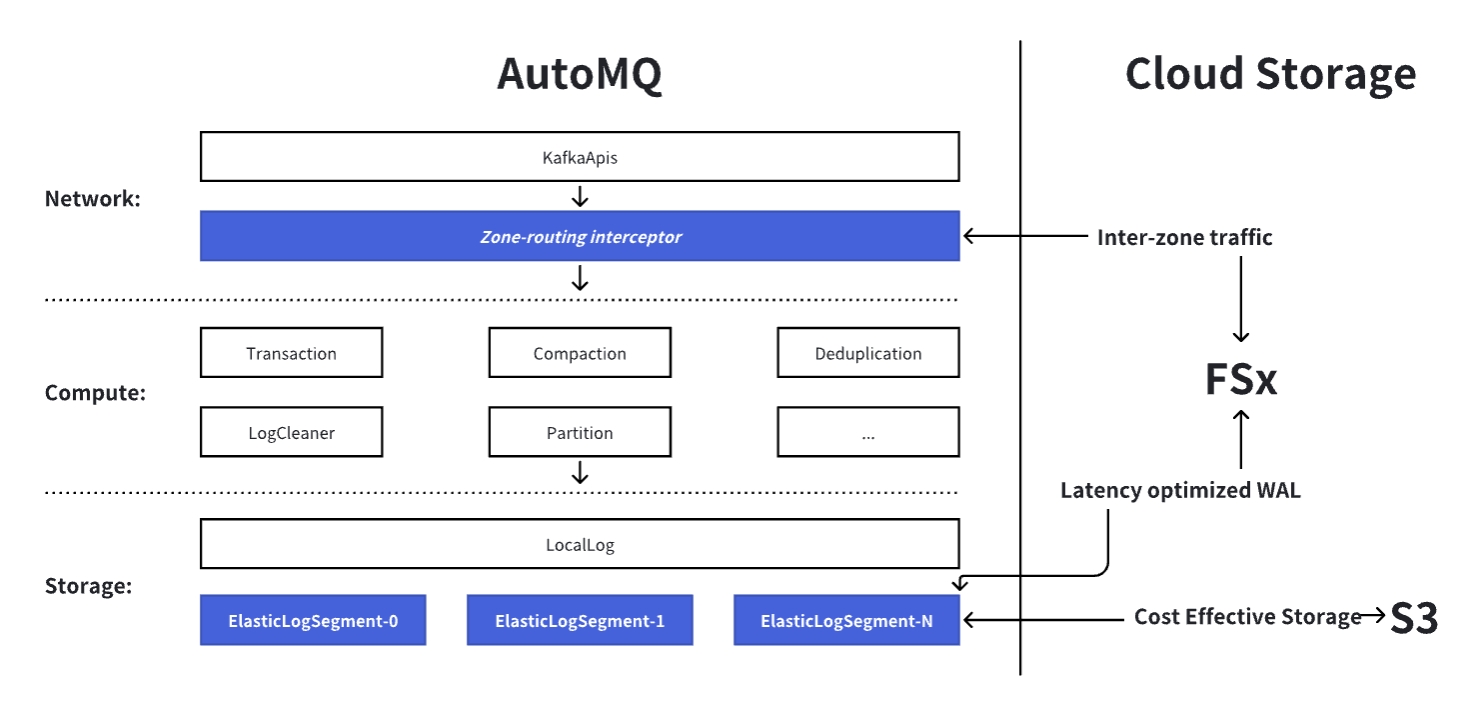
- Compute: the compute layer includes logic such as transactions, compaction, and deduplication. It includes Apache Kafka decades years of new features, client compatibility, and bug fixes, accounting for 98% of the code in the Apache Kafka codebase.
- Storage: the storage layer is responsible for splitting the infinitely long Log into finite-length data segments called LogSegments, and then mapping the LogSegments to specific files in the local file system.
If one wants to implement a 100% compatible Apache Kafka product from scratch, it not only requires adapting to the existing 1000+ KIPs of Apache Kafka but also continuously following up on new features and fixes from the Apache Kafka community in the future, which is an almost impossible task.
Therefore, AutoMQ has chosen to fork from Apache Kafka and carry out cloud-native transformations on its basis to implement a sub-10ms latency Diskless Kafka.
- 100% Kafka Compatible: AutoMQ retains nearly all of the compute layer’s code, allowing it to confidently state that its Kafka Protocol handling behavior is fully consistent with Apache Kafka’s.
- Zero Inter-Zone Traffic: AutoMQ has added a zone-routing interceptor beneath KafkaApis to intercept Produce and Metadata requests. This allows clients to only communicate with brokers in the same zone, thereby achieving zero inter-zone traffic for Kafka clients.
- Diskless: AutoMQ replaces Apache Kafka’s minimum storage unit, LogSegment, with a cloud-native implementation: ElasticLogSegment. ElasticLogSegment writes Kafka Records to the storage acceleration layer FSx with sub-millisecond latency before returning success to the client. In the background, it then asynchronously batches and writes the data to S3. By combining two types of cloud storage—FSx and S3—AutoMQ enables a diskless Kafka solution that delivers both sub-10ms latency and cost-effectiveness.
Eliminating Cross-AZ Traffic
To achieve zero inter-zone traffic on AWS, KafkaProducers and KafkaConsumers must be prevented from communicating with brokers in different zones. Apache Kafka uses a leader-based architecture, where a partition leader resides on exactly one broker. This means that if a KafkaProducer from another zone sends messages to this partition leader, inter-zone traffic will be generated.
To solve this problem, AutoMQ proposes the concepts of main broker and proxy broker:
- Main Broker: The behavior and role of the main broker are consistent with those of the broker in Apache Kafka; it is merely a concept introduced in conjunction with the proxy broker.
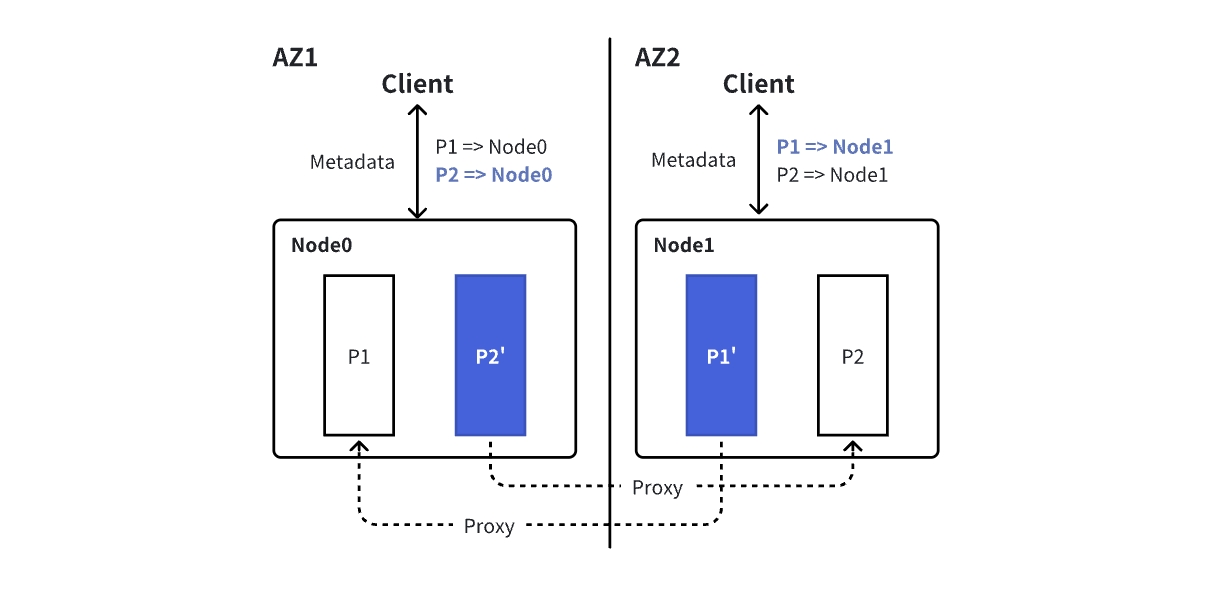
- Proxy Broker: The proxy broker will mirror and synchronize the status of all partition leaders on the main broker, and pretend to be the corresponding partition leader to provide Produce and Fetch services to the Kafka client.
Each main broker has one proxy broker in every other zone. This allows clients in any zone to directly access all partitions of the cluster within their own zone. Note that “main broker” and “proxy broker” are virtual role concepts; a single AutoMQ process can function as both a main broker and a proxy broker for others simultaneously.
To ensure that Produce and Fetch requests only access brokers within the same zone, AutoMQ uses a zone-routing interceptor to intercept Metadata requests. If the broker hosting the partition leader is not in the client’s current zone, the interceptor will replace the broker address in the Metadata response with that of the proxy broker in the client’s zone, based on the client’s zone information.
Take the following diagram as an example: Node0 and Node1 are proxy brokers for each other, where the partition leaders of P1 and P2 are on Node0 and Node1, respectively. The response returned by the client metadata request in AZ2 will be modified to {P1 => Node1, P2 => Node1}.
Through the mechanism described above, we have successfully “pinned” client connections to the local Availability Zone (AZ). However, this is only half the battle.
Since the Proxy Broker essentially acts as a “masquerader,” a critical question remains: When it receives gigabytes of incoming write traffic, how can it ensure data persistence and strong consistency just like a genuine Leader, all while strictly avoiding any cross-zone data transfer?
Write Path
Sub-10ms Zone-Aligned Write
If the actual leader of the partition targeted by KafkaProducer is not in the current zone, the local proxy broker will act as the partition leader to process the Produce request. While the proxy broker appears to the client as the partition leader, it still requires the real partition leader’s participation for data validity verification, deduplication, ordering, and storage when actually performing writes.
To enable low-latency, inter-zone writes without moving large data payloads between zones, AutoMQ uses a lightweight two-phase protocol that leverages FSx as a shared, low-latency buffer.
When a client in any AZ sends a Produce request:
- Prepare Phase (Local Write) The local proxy broker writes the full request data directly to the shared FSx volume (in the same region) and records its position. This happens entirely within the client’s AZ and completes in sub-milliseconds.
- Confirm Phase (Remote Coordination)
a. The proxy broker sends a tiny coordination message (~100 bytes) to the main broker (the true partition leader), which then:
- The main broker executes Partition#appendRecordsToLeader to perform logic such as data verification, deduplication, ordering, and persistence.
- The Record data is written to the latency-optimized WAL (implemented via FSx), at which point persistence is considered successful.
- To reduce FSx write overhead, persistence here only records metadata (including position, as well as offsets and epochs assigned during the append process).
- The complete RecordBatch is still cached in the WAL cache for tail-read and background upload to S3.
b. Embed the ProduceResponse into the confirmation result, return it to the proxy broker, which then forwards the result to the KafkaProducer.
Because FSx is regionally shared and accessible from all AZs via NFS, no actual record data crosses AZ boundaries; only a minimal control message does. This reduces inter-zone traffic by 3–4 orders of magnitude compared to Apache Kafka.
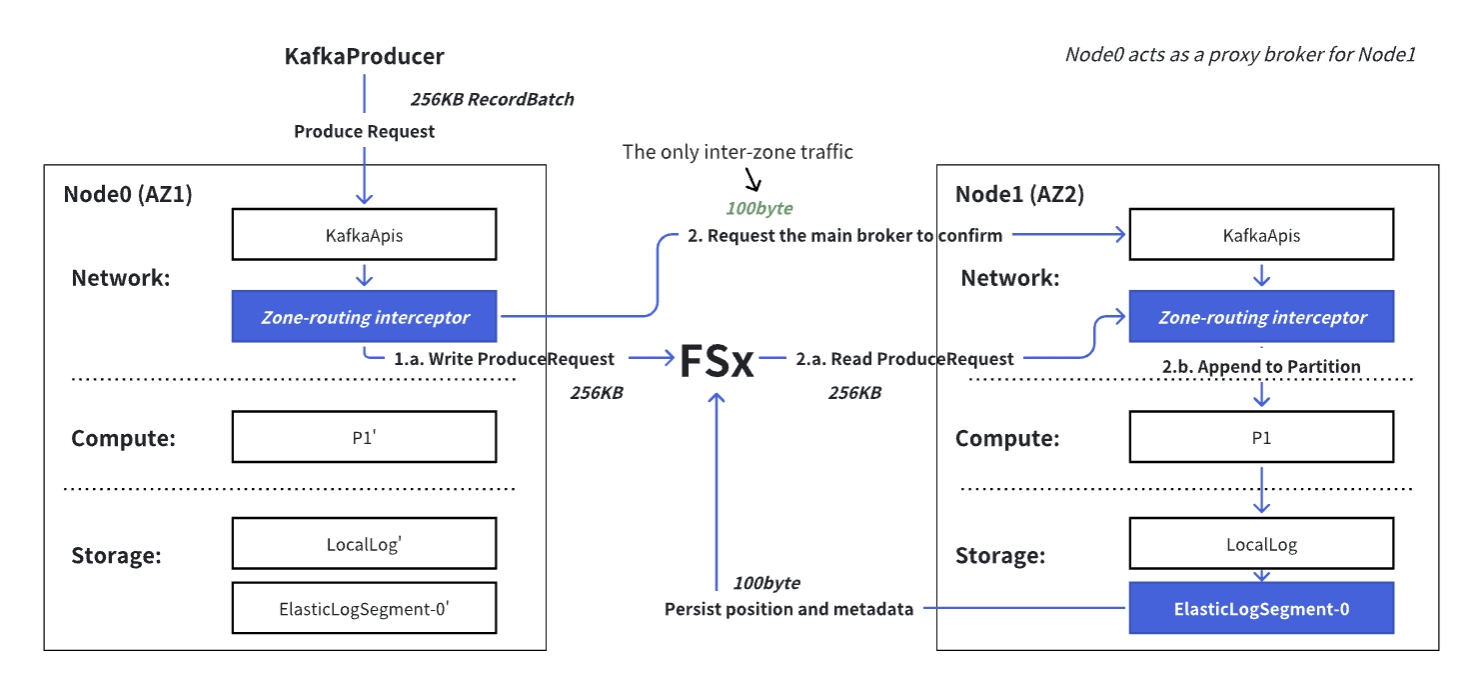
Through this Produce processing flow, we can derive the composition of the processing time for a single ProduceRequest in AutoMQ:
- Write ProduceRequest to FSx
- Inter-zone request Confirm RPC: Inter-zone RPC latency + Read ProduceRequest from FSx + Write confirm record to FSx
In AWS’s us-east-1, the average production latency on the client side is only about 6ms.
Cost-Effective Storage
By leveraging the write path described above, we utilize FSx to achieve ultimate write performance. However, you might ask: “FSx is powerful, but it comes at a premium. Wouldn’t storing massive volumes of historical data be prohibitively expensive?”
This brings us to another key highlight of the AutoMQ architecture: we position FSx strictly as a “high-performance write buffer,” while offloading the heavy lifting of massive data storage to the highly cost-effective S3.
FSx is priced at $0.35 per GB per month, while S3 costs only $0.023 per GB per month. To optimize storage costs, AutoMQ therefore uses FSx only as a durable, low-latency write buffer, with primary data committed to S3.
- When unuploaded data in the WAL cache exceeds 500MiB, or 30 seconds have elapsed since the last upload, AutoMQ commits the WAL cache data (which caches recently written complete RecordBatches) to S3.
- AutoMQ reclassifies and sorts the data by (partition, offset) before uploading it. a. If the data for a given partition exceeds 8MiB, it will be uploaded as an independent object(StreamObject, SO). Compact objects improve the efficiency of reading historical data, while independent objects also facilitate data cleaning for topics with different TTLs. b. Data from the remaining partitions will be grouped and written into a single object (StreamSetObject, SSO) to avoid a linear increase in S3 API call frequency as the number of partitions grows.
- After the data is uploaded to S3, delete the data in FSx.
An AutoMQ cluster with 10 Gbps write throughput and 50 nodes requires only less than 100 GB of total space on FSx via this mechanism.
StreamSetObject (SSO) will further compact in the background to improve cold read efficiency: 1) Small SSO will be compacted into larger SSO; 2) Large SSO will be split into independent SO.
Read Path
By this stage, the data has been safely persisted: expensive “hot data” is temporarily buffered in high-speed FSx, while massive volumes of “cold data” are organized and offloaded to cost-effective S3.
So, how can consumers efficiently read data distributed across these different media with the speed of local disk access, all while maintaining “zero cross-AZ traffic”?
In reality, FSx and S3 store AutoMQ’s recently written data and historical data, respectively. Since both are regional shared cloud storage services, any AutoMQ node can access the complete dataset of the entire cluster.
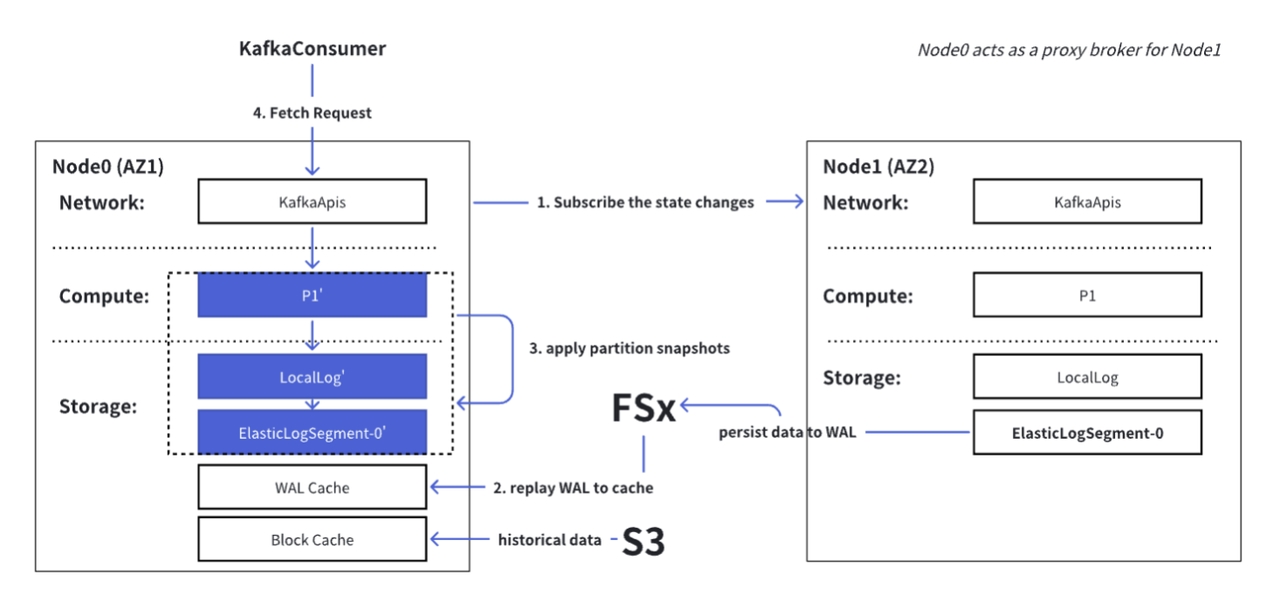
Similar to the write path, AutoMQ uses proxy brokers to simulate partition leaders and provide zone-aligned read services across all zones, ensuring data reading efficiency. The proxy broker’s ability to simulate the main broker lies in mirroring the main broker’s state:
- The proxy broker continuously subscribes to state changes of the main broker, including WAL’s end offset and partition snapshots (high watermark, last stable offset, …).
- The proxy broker first reads the data from the main broker’s WAL in FSx and replays it into the cache.
- Then, it applies the partition snapshots locally. At this point, the proxy broker has completed the state mirroring of the main broker.
- Finally, the proxy broker can directly return the latest written data from the WAL cache to the consumer, while historical data is read from S3 on demand and returned to the consumer.
“If it walks like a duck, quacks like a duck, then it’s a duck.”
Comparison
To summarize, this single architecture delivers the speed of FSx, the cost-efficiency of S3, and zero cross-AZ traffic simultaneously. What does this translate to in a production environment? Let the benchmark data speak for itself.
For a scenario with 1 Gbps write throughput, 1 Gbps consumption rate, and a 3-day TTL, 6 m7g.4xlarge compute instances, and 2 × 1536 GB FSx storage are required. The specific cost breakdown is as follows:
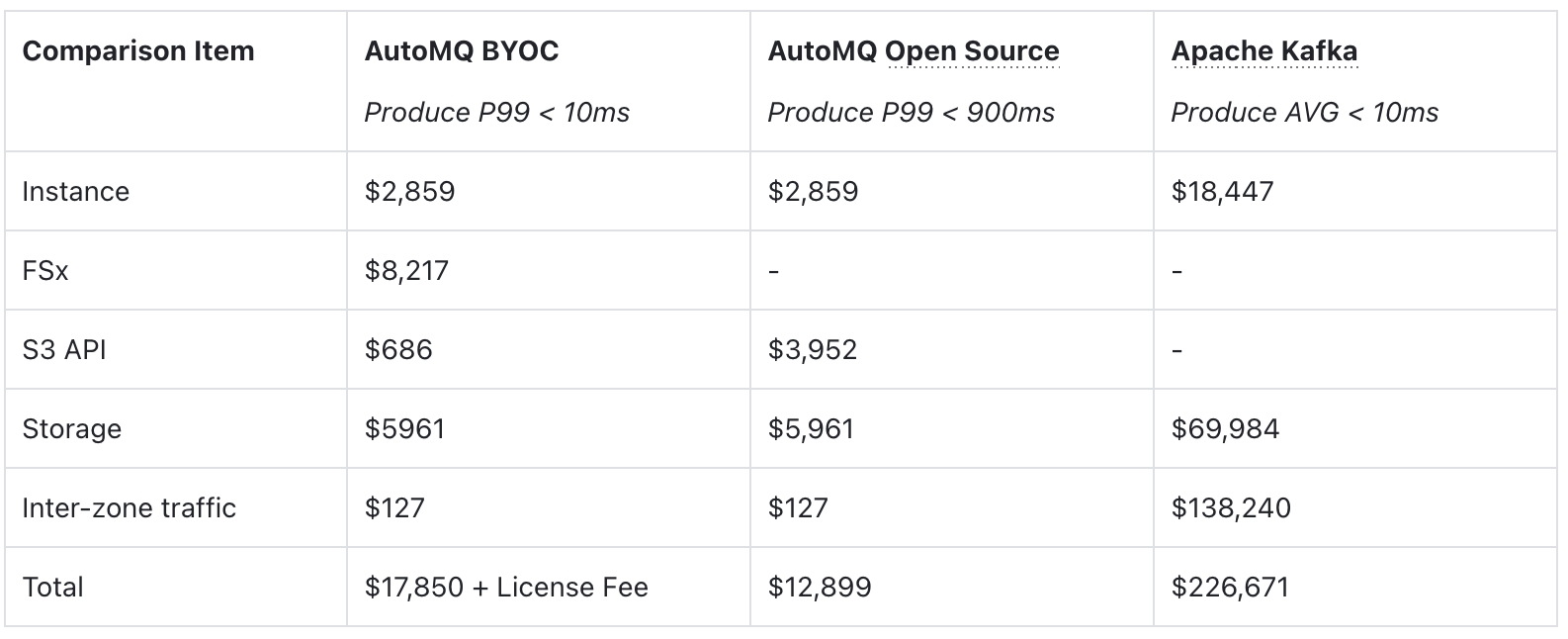
The data of The AutoMQ Open Source & Apache Kafka is referenced from AutoMQ vs. Apache Kafka Benchmarks and Cost.
The conclusion is clear: you no longer need to pay a premium for high performance. Compared to traditional architectures, AutoMQ achieves a TCO reduction of over 10x, all while delivering the same <10ms latency experience.
Conclusion
AutoMQ rewrites the laws of survival for Kafka in the cloud. By perfectly fusing the extreme performance of FSx with the ultimate cost-efficiency of S3, we deliver sub-10ms write latency and true zero cross-AZ costs—all while maintaining 100% Kafka compatibility.
Start your free trial of AutoMQ today and experience the ultimate power of the next-generation cloud-native Kafka.
</div>相关推荐
- 「第三届开放原子大赛」获奖队伍专访来啦!企业篇
- 从本体论到落地实践:制造业数字化转型的核心逻辑与工具选择 | 葡萄城技术团队
- 轻松搞定Excel公式错误:SpreadJS让表格开发不再头疼 | 葡萄城技术团队
- vivo GPU容器与 AI 训练平台探索与实践
- SQLShift V6.0 发布!函数迁移&达梦适配一步到位!
- Oinone × AI Agent 落地指南:别让 AI Agent 负责“转账”:用神经-符号混合架构把它从 Demo 拉进生产
- 借助 Okta 和 NGINX Ingress Controller 实现 K8s OpenID Connect 身份验证
- 同样是低代码,为什么有人扩容有人烂尾?答案藏在交付体系里-拆解 Oinone 的交付底座